What to Include on Your Book’s Copyright Page for KDP and IngramSpark
A Primer on the Copyright Page in Your Self-Published Book

You’ve spent months researching, revising, and polishing your manuscript. Your interior layout is nearly finished, and you’re preparing to upload your print‑ready files to Amazon KDP or IngramSpark—until you reach the copyright page and realize you’re not entirely sure what belongs there.
Many self‑publishing authors treat the copyright page as an afterthought. It sits quietly behind the title page in small font, easy to overlook. But when you publish independently, this page carries real legal and operational weight. It protects your intellectual property, provides key metadata for libraries and retailers, sets boundaries for disclaimers, and, if done incorrectly, can cause IngramSpark rejections, formatting delays, or make your book look amateurish.
As a nonfiction self-publishing strategist, I’ve helped hundreds of authors move from a finished Word document to print‑ready proofs on KDP and IngramSpark. In this guide, I’ll break down every element of a professional copyright page, clarify what’s required versus optional, explain layout conventions and platform‑specific rules, and share complete templates you can adapt for your book.
If you’re working with a designer or formatter, they’ll create a copyright page for you, but understanding your options helps you make informed choices. If you’re using a design program with preset templates, this guide will show you how to tailor them to your book.
Where Does the Copyright Page Go in Your Book?
In standard book design, the copyright page lives on page iv of your front matter, positioned directly on the verso side (the left-hand page) immediately following the main title page (the right-hand page). This page, like the others on this list, is, of course, unnumbered.
Your front matter sequence should follow traditional publishing conventions:
Half Title Page (Page i – Right-Hand Page)
Blank Page or Also by Author (Page ii – Left-Hand Page)
Full Title Page (Page iii – Right-Hand Page)
Copyright Page (Page iv – Left-Hand Page)
Dedications or Epigraph (Page v – Right-Hand Page)
Table of Contents (Page vii – Right-Hand Page)
Copyright Page Layout and Typography: Is Everything Centered?
A common question self-publishing authors ask when designing their front matter is how to align the text block on a copyright page. Specifically, is everything centered on the page and center-justified?
The short answer is no. Professional book designers almost never center-justify or fully center a copyright page.
In traditional trade book design, centering an entire page of legal block text creates ragged, awkward edges on both sides that look amateurish and difficult to read. Instead, professional interior layout design adheres to very specific typographic standards:
Text Alignment: The text block is left-aligned (flush left, ragged right). Left alignment keeps line lengths natural and creates clean, professional margins.
Vertical Page Positioning: Rather than centering the text block vertically in the middle of the page, the text is placed in the lower third or bottom half of the page. This leaves comfortable white space above the block, mirroring the layout used by major traditional publishing houses.
Font Size and Style: The font size can be the same or slightly smaller than your main body text. The font should be a clean, legible font that matches or complements your body text (such as Garamond, Caslon, Minion, or Sabon).
Line Spacing and Paragraph Breaks: Keep line spacing tight (1.1x to 1.2x) and separate distinct sections, such as the copyright line, ISBN block, disclaimers, and credits, with simple 4-point to 6-point paragraph spacing rather than large blank gaps.
If you use professional book formatting software like Vellum or Atticus, these tools automatically apply left-aligned, bottom-positioned layouts by default. If you format your interior layout manually in Adobe InDesign or Microsoft Word, ensure you align your text to the left margin and anchor the text frame to the lower portion of page iv.
Anatomy of a Copyright Page: Mandatory, Customary, and Optional Elements
A professional copyright page in a book serves three distinct audiences: your readers, search databases used by booksellers and librarians, and print platforms like KDP and IngramSpark.
To help you decide what to include on your copyright page, let us break down every possible element into three categories: mandatory, customary, and optional, including a concrete example for every single item.
The information below is presented in the order in which it commonly appears, but the precise order is not important.

1. Mandatory Elements (Required by Law or Distribution Platforms)
If you skip these basic components, your print file may fail validation on IngramSpark or KDP, or you may undermine your legal protections.
The Copyright Notice: The legal foundation of the page. By international copyright law, a valid notice requires three parts: the copyright symbol (©), the year of first publication, and the full legal name of the copyright holder (either your real name or your publishing entity/LLC). As a US author, you can put this in your book whether or not you formally registered your book with the US copyright office.
Example: Copyright © 2027 by Jane Author
Reservation of Rights Notice: An explicit statement asserting that you retain exclusive rights to reproduce, distribute, or transmit the work.
Example: All rights reserved. No part of this publication may be reproduced, distributed, or transmitted in any form or by any means without the prior written permission of the publisher.
The ISBN (International Standard Book Number): Every print format requires a unique 13-digit ISBN. If you publish paperback, hardcover, and ebook editions, list each ISBN clearly, ideally with each one on its own line, so catalogers and readers can identify every format.
Example: ISBN: 978-1-950000-00-0 (paperback) | ISBN: 978-1-950000-01-7 (hardcover)
2. Customary and Expected Elements (Standard Trade Publishing Conventions)
While technically optional under strict copyright statutes, these components are expected by booksellers, libraries, and industry professionals. Including them makes your self-published title look indistinguishable from a major trade house release. They are not strictly required.
Publisher Name and Imprint: If you established an LLC or custom imprint name for your self-publishing business, place it prominently. If you publish directly under your name, list your publishing brand or official author website.
Example: Published by Harbor Light Press
Country of Printing: Print-on-demand platforms like IngramSpark and KDP require a country-of-origin identifier for international trade compliance and customs declarations. However, for reasons explained later, if you’re publishing through KDP or IngramSpark, there is no need to include this, as it is automatically generated for you upon printing and added to your book (though not on the copyright page).
Example: Printed in the United States of America
Edition Information: Indicate whether this is the first edition, a revised second edition, or a special expanded edition.
Example: First Edition, 2027
Publisher Website or Contact Information: Provide a direct URL or contact email where readers, media outlets, and rights buyers can reach you or submit formal permissions requests.
Example: For permissions requests or bulk order inquiries, visit [your URL here].
Library of Congress Control Number (LCCN): If you obtained an LCCN through the Library of Congress Preassigned Control Number (PCN) program, display it here. It assists librarians when cataloging your book into national database systems. This is purely optional, and is for American authors only.
Example: Library of Congress Control Number: 2027900000

3. Optional and Specialized Elements (With Concrete Examples for Each)
These specialized clauses allow you to tailor your copyright page to your book’s specific genre, content, and production team.
These are not required, and the examples are just examples. Feel free to tailor them to your own needs and even to match your authorial tone and voice.
Liability Disclaimers: A disclaimer on a book’s copyright page serves one core purpose: to limit your legal exposure. As Suzanne Sherman explains in her article about disclaimers in a book, “Disclaimers serve to protect the author and publisher against liability when their book’s topic might invade someone’s privacy or result in a claim of defamation.”
Disclaimer Example (Legal Advice/Nonfiction): This book is intended for informational and educational purposes only and does not constitute medical advice. The content is not a substitute for professional diagnosis, treatment, or guidance from a qualified healthcare provider. Always consult your physician or other licensed health professional before making any changes to your diet, exercise routine, medications, or wellness practices. The author disclaims any liability for actions taken based on the information presented in this book.
Disclaimer Example (Fiction): This is a work of fiction. Names, characters, places, and incidents are products of the author’s imagination or are used fictitiously. Any resemblance to actual persons, living or dead, is purely coincidental.
Disclaimer Example (Memoir): This memoir reflects my personal experiences, memories, and perspectives. While I have done my best to portray events accurately, some details have been reconstructed, condensed, or altered for clarity, privacy, and narrative flow. Names, identifying characteristics, and certain events have been changed or combined to protect the privacy of individuals.
Artificial Intelligence (AI) and Machine Learning Restrictions: A modern protection clause explicitly prohibiting tech platforms from scraping your text to train artificial intelligence or large language models without authorization.
AI Training Prohibition Example: No part of this book may be used or reproduced in any manner whatsoever for the purpose of training artificial intelligence technologies or large language models without the prior written permission of the author.
Production Credits (Designers, Editors, and Illustrators): Public recognition for the professional team that helped bring your book to market, with each person credited on their own line. Some professionals require credit; I do not, and it does not matter to me whether I am mentioned. Some authors include this section as a gesture of appreciation or to show they invested in a team. Others omit it to keep the page streamlined. If you have an acknowledgments page, you can always recognize contributors there.
Cover Design Credit Example: Cover design by Jane Doe.
Editing Credit Example: Editor: John Doe.
Cover Image Credits (if purchased or licensed).
Platform Specifics: KDP vs. IngramSpark
When preparing files for print-on-demand distribution, you should understand how Amazon KDP and IngramSpark handle certain copyright page elements.
Amazon KDP Considerations
Amazon KDP is forgiving regarding copyright page design, but keep a few rules in mind:
ISBN Consistency: The ISBN on your copyright page must match the ISBN in your KDP dashboard metadata. If you use a free KDP-assigned ISBN, list “Independently published” or leave the publisher name blank if required.
Printer Key Sequence: Traditional publishers use a printer key (e.g., 10 9 8 7 6 5 4 3 2 1) to track print runs. Because KDP uses print-on-demand, a printer key is unnecessary. Omit it.
Printing Location: KDP prints books across facilities worldwide. “Printed in the United States of America” or “Printed in the United Kingdom” is optional. KDP automatically prints a tracking barcode and manufacturing information on the last interior page of your book.
IngramSpark Considerations
IngramSpark maintains stricter file standards, especially for bookstore and library distribution:
Imprint Ownership and ISBN Consistency: The publisher name registered with Bowker (or your national ISBN agency) must match the imprint name on your IngramSpark account and your copyright page. ISBN information must also match. Mismatched names and incorrect ISBNs cause submission flags.
Printer Key Sequence: Omit it. IngramSpark uses print-on-demand, so a traditional printer key is unnecessary.
LCCN Display: If you obtained a Library of Congress Control Number, ensure it appears cleanly on your copyright page so library systems can import your metadata.
Clearances for Permissions: IngramSpark’s partners enforce copyright compliance. If your book includes third-party images or lengthy quotes, keep your permissions log organized in case proof of rights is requested.
Printing Location: As with Amazon KDP, you don’t need to include this. IngramSpark automatically places manufacturing and printing location information in your book.
Formatting copyright pages, setting up IngramSpark, and finalizing interior print proofs are just the final stretch of bringing your book to life. If you want an expert partner to guide you through every step—from platform setup to launch strategy—you don’t have to do it alone.
Whether you’re looking for a comprehensive Self‑Publishing Coaching Package to take you from finished manuscript to print‑ready files, a focused 1:1 Strategy Call to solve immediate formatting or distribution roadblocks, or a Done‑With‑You Book Marketing Plan to ensure your launch reaches the readers who need your book most, I’m here to help you publish with clarity and confidence. I’ve been working with American nonfiction authors for the past decade.
👉 Book a 1:1 Strategy Call or explore Self‑Publishing Strategy Sessions and Coaching Packages today!
Copyright Page Examples for Amazon KDP and IngramSpark
To help you design the perfect copyright page for your book, here are three complete, formatted templates. You can copy, customize, and drop these directly into your interior formatting software like Vellum, Atticus, or Adobe InDesign.
Programs such as these typically offer suggested copyright text you can use, and an experienced formatter/designer can generate a copyright page for you, although if you have certain preferences, it can be useful to be prepared!
Again, the text of a copyright page is left aligned, and is placed so that it ends at the bottom of the page.
The copyright page examples provided in this article are entirely fictional and created for illustrative purposes only. They do not represent real books, authors, publishers, or entities, and any resemblance to actual works or individuals is purely coincidental.
Example 1: Standard Nonfiction Copyright Page with Legal/Finance Disclaimer
This copyright page sample is designed for authors writing business, real estate, personal finance, self-help, or health books where clear copyright page disclaimers are necessary to limit legal liability.
PUBLISHED BY HARBOR LIGHT PRESS
www.harborlightpress.com
How to Invest in Commercial Real Estate: A Practical Guide for Beginners
Copyright © 2027 by Marcus Vance
All rights reserved. No part of this book may be reproduced, stored in a retrieval system, or transmitted in any form or by any means, electronic, mechanical, photocopying, recording, or otherwise, without the prior written permission of the publisher, except in the case of brief quotations embodied in critical articles or reviews.
DISCLAIMER
This book is designed to provide information in regard to the subject matter covered. It is sold with the understanding that author is not engaged in rendering legal, accounting, financial, or investment advice. The strategies outlined in this book may not be suitable for every individual. The author shall not be liable for any loss of profit or any other commercial damages resulting from the use of this material.
First Edition: February 2027
Paperback ISBN: 978-1-950000-00-0
Hardcover ISBN: 978-1-950000-01-7
Ebook ISBN: 978-1-950000-02-4
Library of Congress Control Number: 2027900000
Example 2: Copyright Page with AI / Machine Learning Opt-Out Clause
This copyright page example includes an explicit artificial intelligence opt-out clause to protect your intellectual property from unauthorized data scraping and model training.
PUBLISHED BY BEACON POINT PUBLISHING
Boston, Massachusetts
www.beaconpointpublishing.com
The Mindful Executive: Leadership Strategies for Modern Workplaces
Copyright © 2026 by Sarah L. Jenkins
All rights reserved. No part of this publication may be reproduced, distributed, or transmitted in any form or by any means, including photocopying, recording, or other electronic or mechanical methods, without the prior written permission of the publisher, except in the case of brief quotations embodied in critical reviews and certain other noncommercial uses permitted by copyright law.
Example 3: Copyright Page with Credits
This copyright page example includes a shout-out to the team of professionals who helped make this book a reality.
Copyright © 2027 by Marcus Z. Johnson
All rights reserved. Unauthorized reproduction or transmission of this publication is prohibited, except for brief quotations in reviews or as permitted by copyright law.
First Edition: 2027
Cover Design by John Doe
Edited by G. Willakers
ISBN: 978-1-234567-89-0
More Copyright Page Samples
Here are three actual copyright pages from highly successful indie authors. You’ll notice that each one does things a little differently, and you can too.
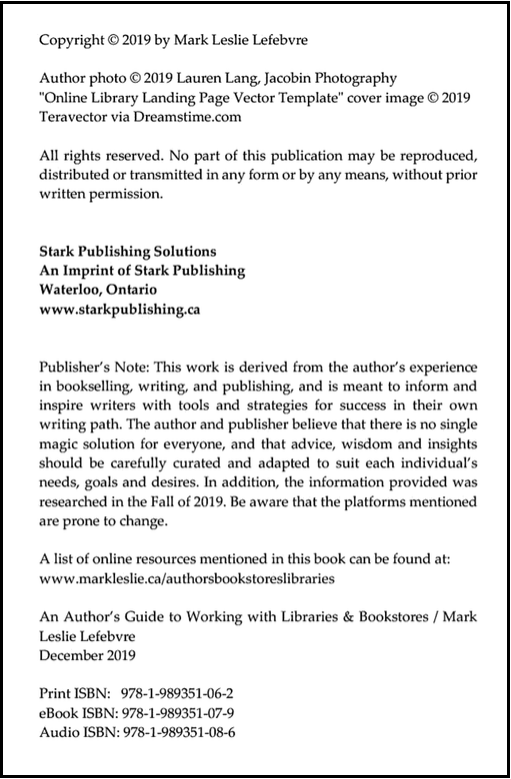
From An Author’s Guide to Working with Libraries and Bookstores by Mark Leslie Lefebvre
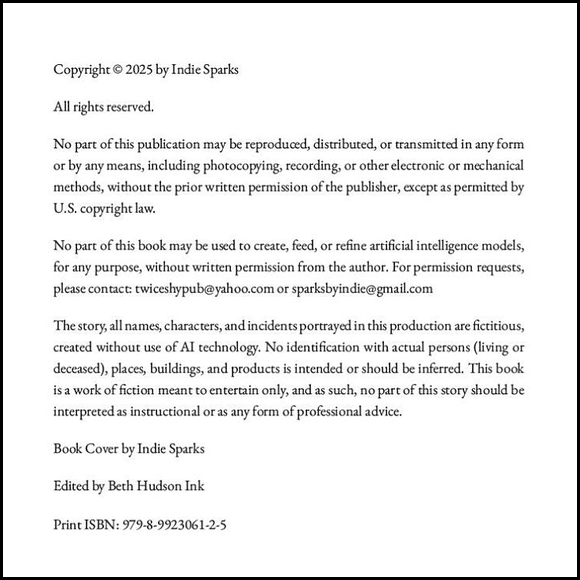
From Missed Exit: A Poorly Navigated Romantic Comedy by Indie Sparks
From Missed Exit: A Poorly Navigated Romantic Comedy by Indie Sparks
[insert image: copyright-page-example-amazon-kdp.jpg / Alt text: A book copyright page layout featuring the “All rights reserved” statement, medical advice disclaimer, and ISBN information.]
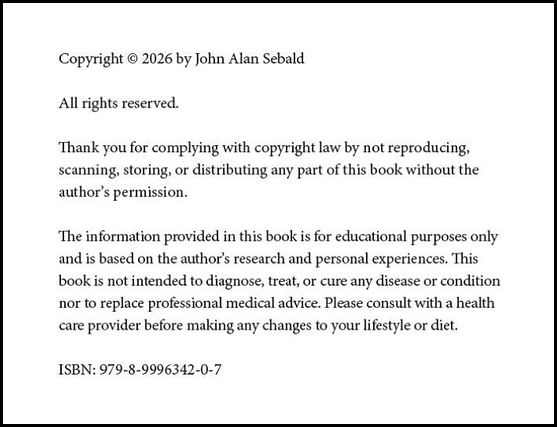
From Live Again! by John Alan